 Photo: Retro Lenses, CC BY 4.0, Wikimedia Commons
Computer Vision, lecture 1
What is computer vision?
Why seeing is hard for computers, how the field started, and what we will learn
What do you see?
Photo: Retro Lenses, CC BY 4.0, Wikimedia Commons
What the computer gets
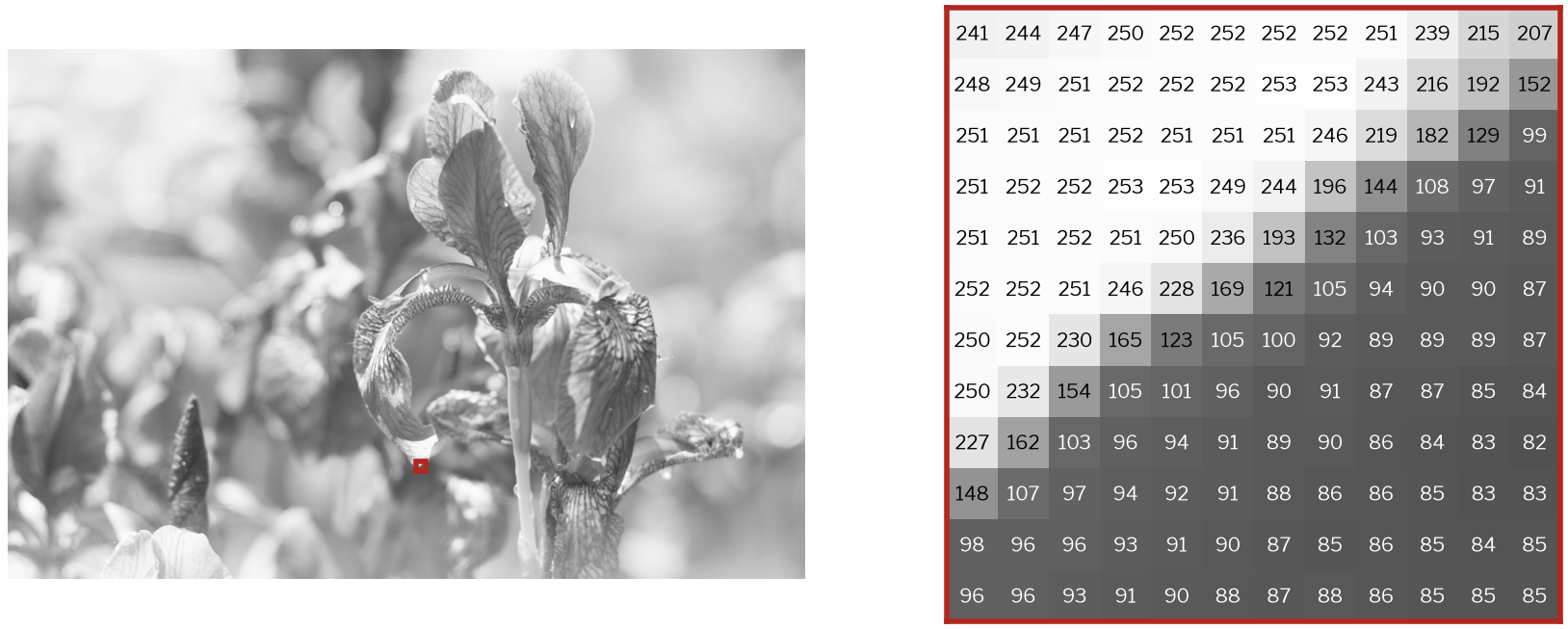 Photo: Retro Lenses, CC BY 4.0, Wikimedia Commons
A picture is a grid of numbers. This photo is 1328 × 2000 pixels × 3 colours: about 8 million numbers. Not one of them says "flower".
A simple definition
Computer vision
Making computers get useful information from pictures and videos.
Three kinds of useful information:
- Measure: where things are, how big, how far, how they move
- Recognise: what things are
- Act: what to do next (a robot picks up a box, a car brakes, a doctor gets a warning)
Part 1: Why is seeing hard?
We see without effort, so we think it is easy.
Vision is graphics in reverse
Graphics: world → picture
We know the shapes, colours, lights and camera. We calculate the picture.
- One correct answer
- Physics tells us how
Vision: picture → world
We have only the picture. We must guess the shapes, colours, lights and camera.
- Many worlds give the same picture
- Some information is lost
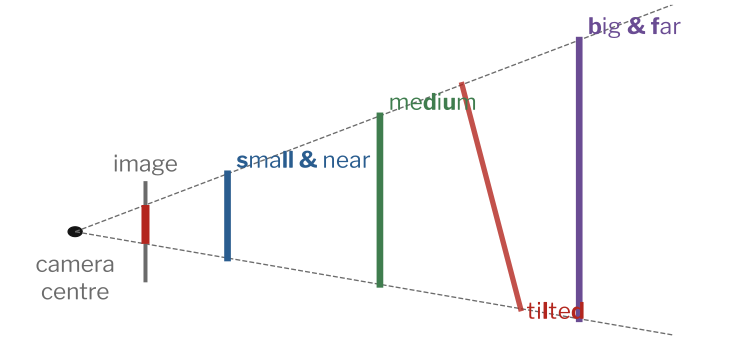
A photo loses distance
Every object between the two lines makes exactly the same picture.
One object, many pictures
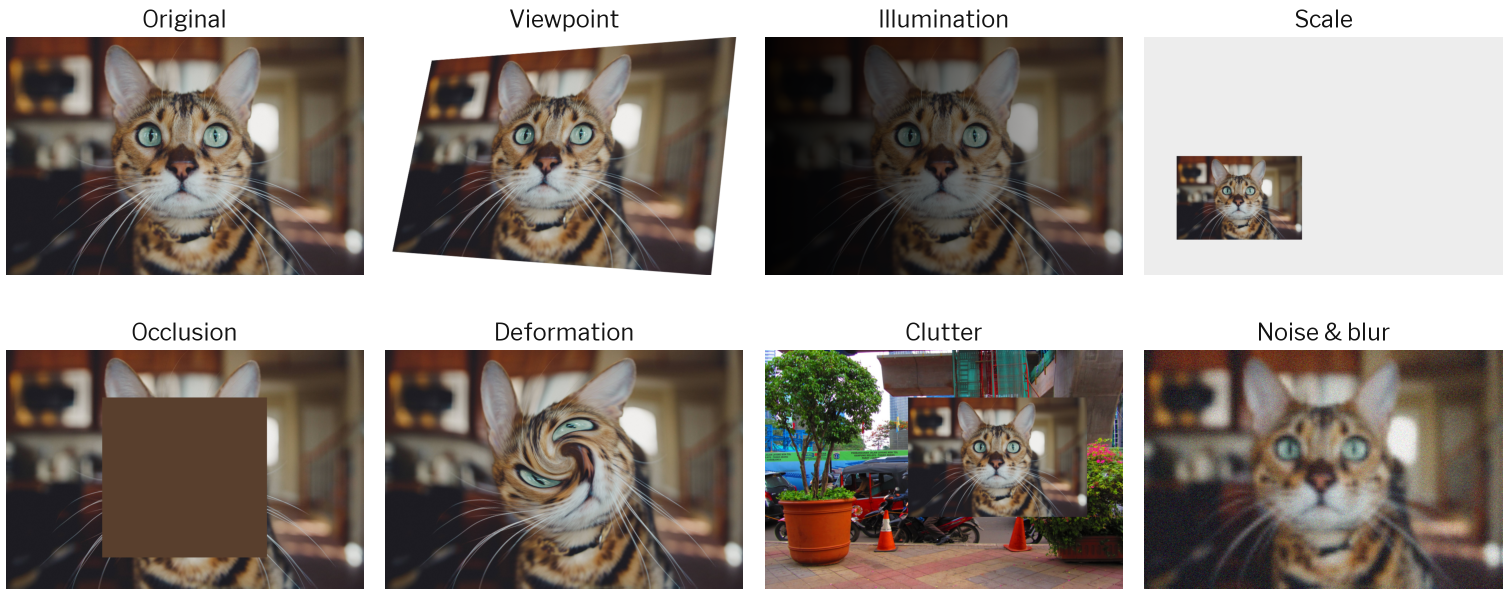 Cat: Caleb Woods, CC0. Street: Nugroho Adie, CC BY 2.0. Both via Wikimedia Commons
A program must say "cat" for all of these, and "not cat" for everything else.
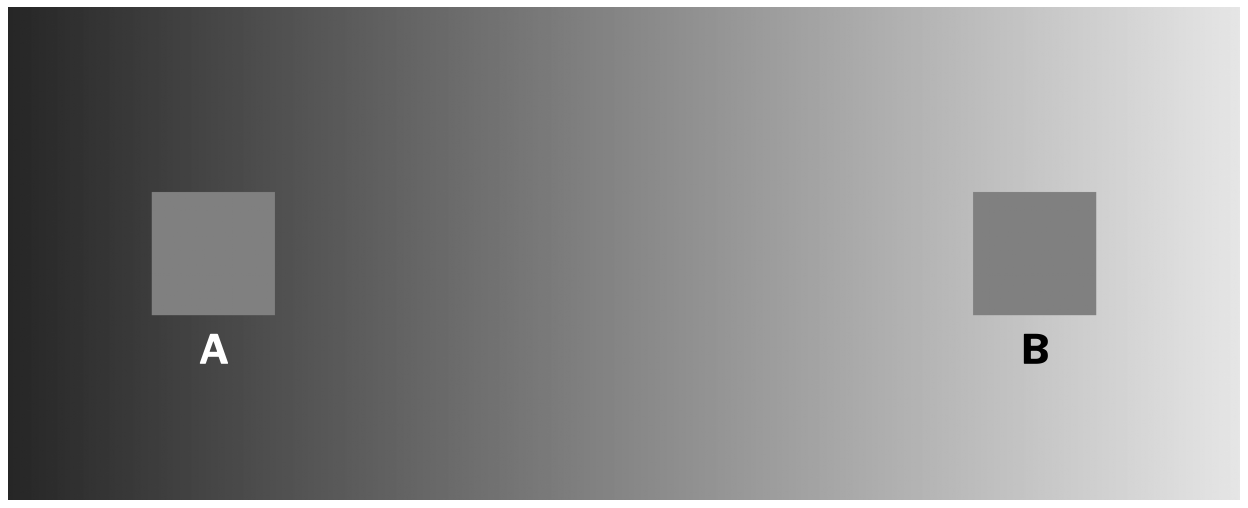
Your eyes guess too
Which square is brighter, A or B?
The gap between numbers and meaning
What the computer has
- 8 million numbers from 0 to 255
- no objects, no edges, no distance
- no names
What we want
- "purple flowers in a garden, on a sunny day"
- where each flower is
- what kind of flower it is
The distance between pixel numbers and meaning is called the semantic gap. This course is a set of tools to cross it.
Think, pair, share (4 minutes)
With the person next to you, find:
- one task that is easy for a 5-year-old child but hard for a computer, and
- one task that is easy for a computer but hard for a person.
Say why for each one.
Part 2: How did we get here?
Sixty years in five slides.
A short history
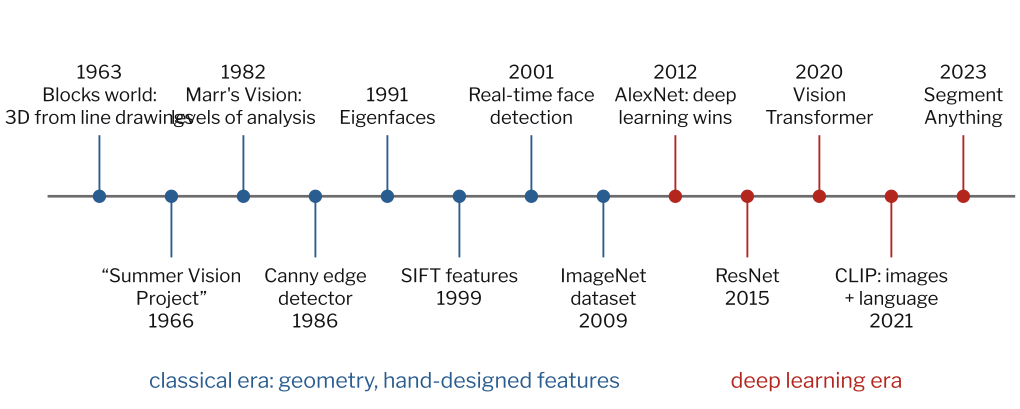
What computers could do, then and now
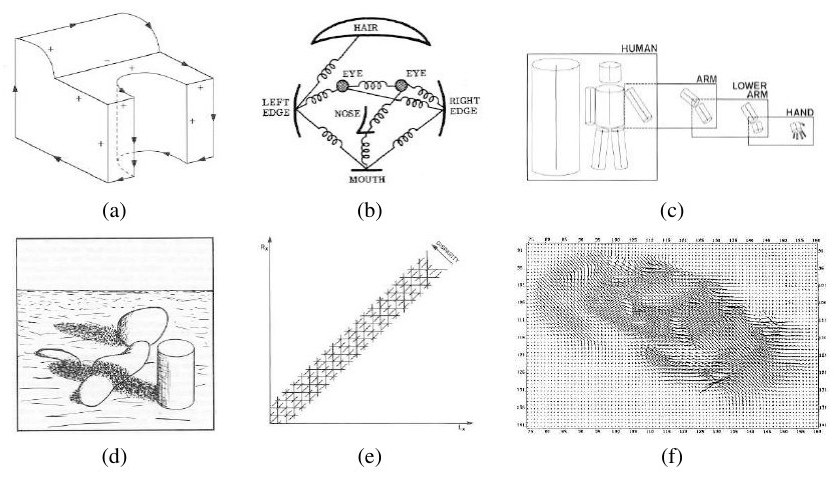 1970s. Szeliski (2022), Fig. 1.7
 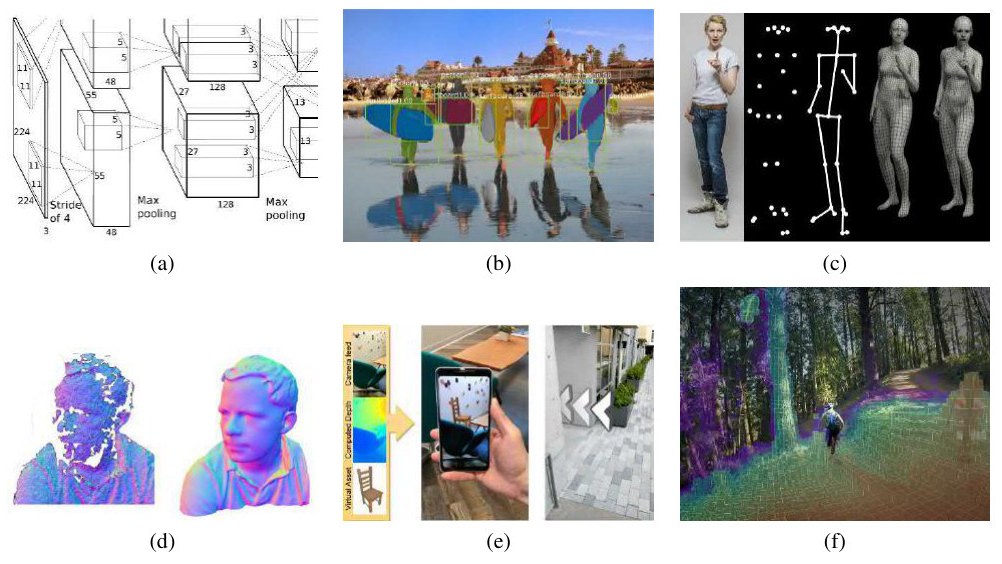 2010s. Szeliski (2022), Fig. 1.11
The summer that took sixty years
In 1966, a plan said a group of students could build important parts of a seeing machine in one summer.
Sixty years later, many thousands of people work on it. It is still not finished.
Lesson: seeing feels easy because it happens without thinking, not because it is simple.
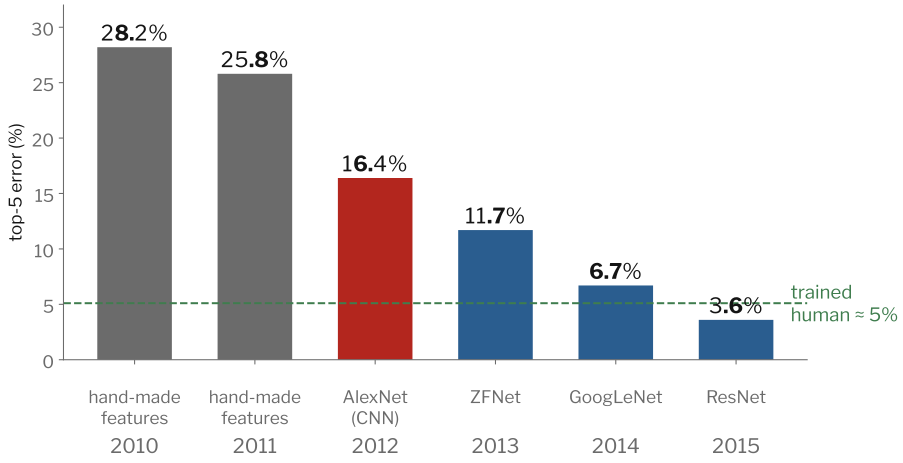
2012: the big change
Winners of the ImageNet challenge (1000 kinds of objects). "Top-5 error": the right answer is not in the computer's 5 best guesses.
Old ideas are still inside new methods
| Older idea (Part I of this course) |
Lives on in… (Part II) |
| Filtering a picture with a small grid of numbers |
the convolution layer, with learned numbers |
| Looking at a picture at many sizes |
detectors that find big and small objects |
| Edges, corners, small patterns |
what the first layers of a network learn |
| Camera geometry |
3D, AR, robots, depth networks |
| Grouping similar pixels |
segmentation |
Part 3: What can computer vision do?
The main tasks
Also: body pose · tracking · depth and 3D · motion · describing a picture in words · making new pictures
The same tasks on real photos
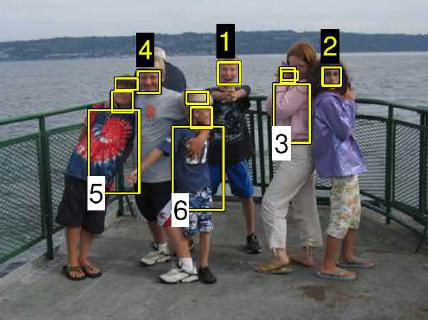 Detection. Szeliski (2022), Fig. 1.2a, from Sivic, Zitnick and Szeliski (2006)
 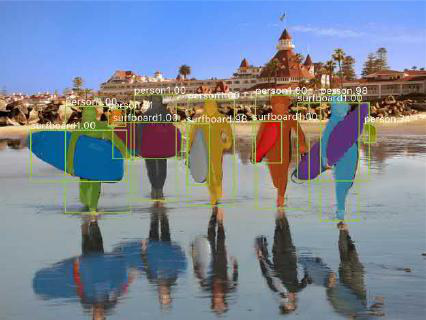 Instance segmentation. Szeliski (2022), Fig. 1.2b, from He et al. (2017)
Vision at work
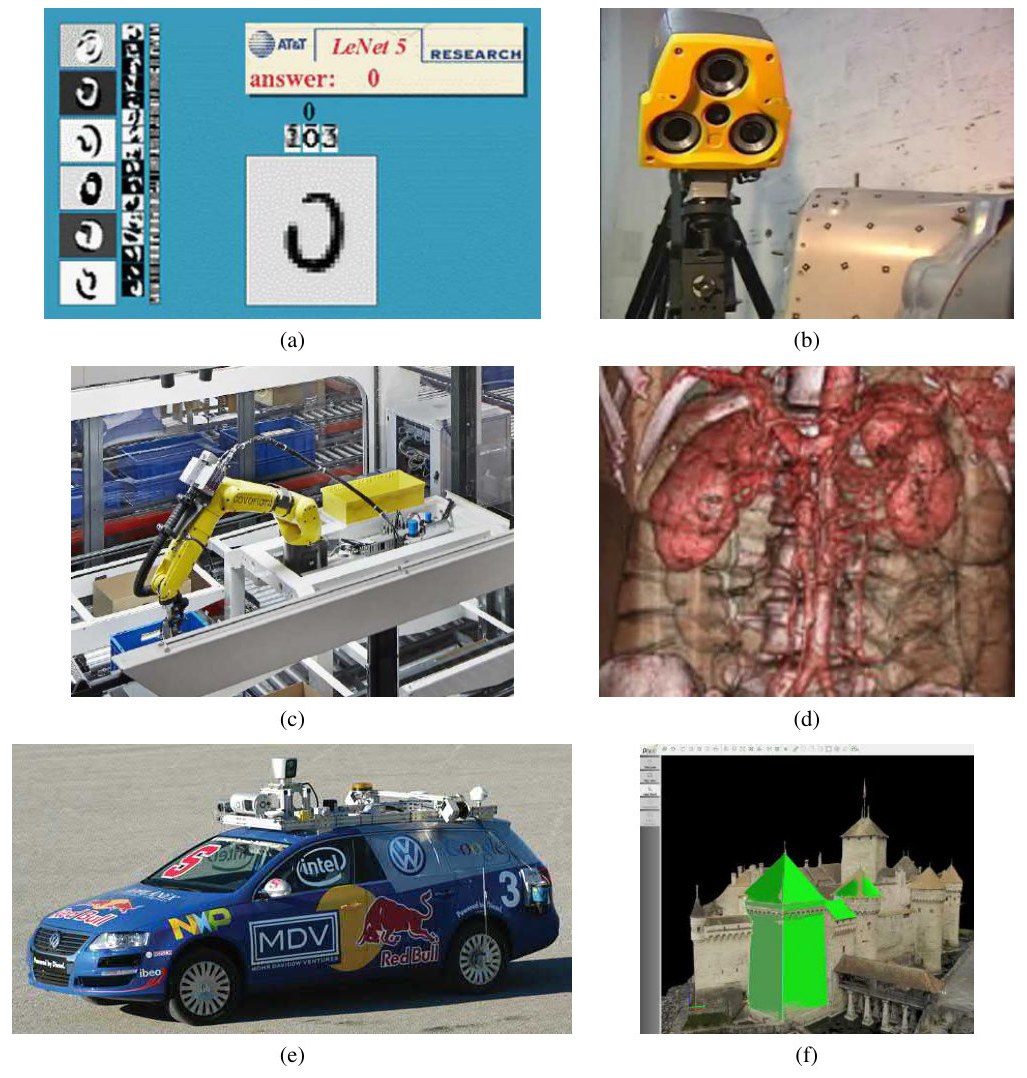 Szeliski (2022), Fig. 1.4
- reading handwritten numbers
- measuring parts in 3D
- robots picking items from boxes
- medical scans
- self-driving cars
- 3D models from drone photos
More places that use vision
- Phones: face unlock, portrait blur, night mode, document scanning
- Factories: finding defects, measuring, sorting, reading serial numbers
- Transport: driver help, licence plate reading, counting traffic, parking
- Health: checking X-rays and eye scans; counting cells under a microscope
- Farming: sorting fruit, finding plant disease, counting crops from drones
- Shops and delivery: checking shelves, reading parcels
- Satellites: mapping floods, forests and cities
- Media: photo editing, search, sports analysis
The parts of a vision system
Light → Camera → Clean-up → Features → Model → Decision
- Camera and light: often the cheapest place to fix a problem
- Clean-up: remove noise, fix colours, resize
- Features: useful numbers, designed by people or learned
- Model: rules, a classifier, or a neural network
- Decision: a threshold, business rules, or a person who checks
- Data and testing are needed for every part
Design task (5 minutes, groups of 3)
A fruit packing house wants to sort mangoes into "ripe" and "not ripe" on a moving belt. 5 mangoes pass every second.
- What camera and light would you use?
- What exactly is the output? Which task is it?
- What makes it hard? (List the changes from the cat slide.)
- Which mistake is worse: a ripe mango sorted as not ripe, or the other way round?
Course map
Part I: Images and classical vision
- What is computer vision?
- Image formation
- Images as signals
- Linear filtering and edges
- Pyramids and scale
Part II: Learning to see
- From classifiers to neural networks
- Convolutional networks and transformers
- Features and matching
- Object recognition and detection
- Image segmentation
- Video, motion and temporal models
- Vision and language
A picture really is a table of numbers
import cv2                         # OpenCV
img = cv2.imread("iris.jpg")       # load the photo

print(type(img))      # <class 'numpy.ndarray'>
print(img.shape)      # (1328, 2000, 3) -> height, width, colours
print(img.dtype)      # uint8           -> whole numbers 0..255
print(img[650, 950])  # [241  88 173]   -> one pixel: B, G, R (!)

gray = cv2.cvtColor(img, cv2.COLOR_BGR2GRAY)
print(gray.shape)     # (1328, 2000)
Summary
- Computer vision turns pixels into useful information: measure, recognise, act.
- It is hard because a photo loses information, so vision must use clues and guesses.
- The numbers change a lot with angle, light, size, covering and shape. Good methods ignore these changes but still tell objects apart.
- The field moved from features designed by people to features learned from data (2012). Old ideas still live inside new methods.
- Choose the task from the output you need: a label, boxes, outlines, tracks.
Exit ticket (on paper or in chat)
- In one sentence: why can't a computer just calculate the 3D world from one photo?
- Name three changes a cat detector must handle.
- You want to count cars in a parking lot. Which task would you use? Why?
Next lecture: how a camera turns light into numbers.